
On this page
- Quick Reality Check: What the IRS Expects From You
- The December Money Picture: Income, Invoices, and 1099 Prep
- Expense Sweep: Receipts, Subscriptions, and Mileage
- Setting Up 2026 Systems: Calendars, Templates, and Automations
- Mental and Physical Clean-Up: Clearing Space to Work Like a Business Owner
- Taking Control of Your December Tax Prep
If April is when you file taxes, December is when you organize your income, invoices, receipts, and 1099s so tax season feels predictable instead of stressful. By walking through a clear December checklist, you can retain more of what you’ve earned, reduce audit risk, and enter January with a calm and organized mindset.
Quick Reality Check: What the IRS Expects From You
Recent TaxAct® survey data reveals that 92% of people expect side hustles to become the new normal, reflecting the growing popularity of gig work, freelancing, content creation, and online marketplaces. Yet, 56% admit they don’t fully understand how to report and file taxes on the income from their side gigs. This gap shows how important clear, practical tax guidance is for freelancers, contractors, and solopreneurs who manage income from multiple sources in today’s evolving work landscape.
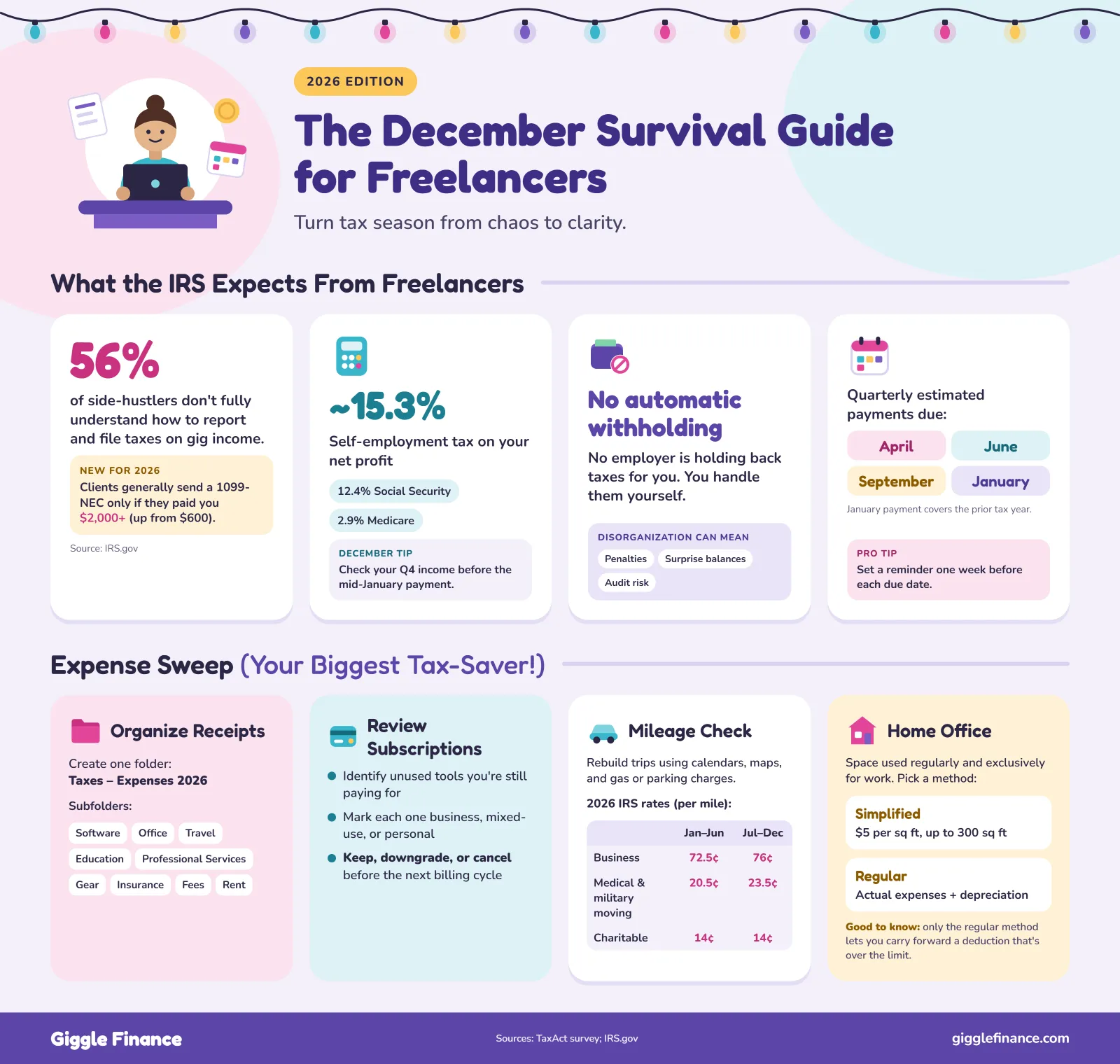
If you are a freelancer or independent contractor, you are required to report all your business income, even if you never receive a 1099 from a client. On top of regular income tax (depending on your state), you typically pay self-employment tax, which covers Social Security (12.4%) and Medicare (2.9%), and often sits around 15.3% of your net gig work profit.
Because there is no automatic withholding on most freelance income, many self-employed workers are expected to pay estimated quarterly taxes. These payments are usually due in April, June, September, and the following January for the prior year. In other words, you do not have an employer withholding taxes or tracking expenses for you, so disorganization shows up quickly in penalties, surprise balances due, or higher audit risk.
December is when you can see your Q4 income clearly enough to decide whether you need to adjust before the mid-January payment and the April filing comes around. Keeping an eye on this timing helps you avoid underpayment penalties and big surprises.
Having a simple December routine makes all of that much more manageable. Using this month to review income, close out invoices, organize expenses, and prepare documents can help make your future tax filing faster and give a clean base for business planning in the new year, rather than dragging old clutter into January.
The December Money Picture: Income, Invoices, and 1099 Prep
Before closing the books on this year, take time to review your freelance income, outstanding invoices, and expected tax documents. By tracking what you earned, noting what’s still unpaid, and preparing for 1099s from clients, you ensure that your records are accurate and complete, setting the stage for a stress-free tax filing.
Tally Your True Income for the Year
Download your full-year transaction history from your business bank accounts, work credit cards, and payment platforms like PayPal, Stripe, Square, or Venmo. If you use invoicing or bookkeeping software, be sure to export your complete list of invoices as well.
Next, compare these records carefully. Look for deposits in your accounts that lack a corresponding invoice or sales record. Then check for invoices that are unpaid or only partially paid.
It’s also essential to verify that payments recorded by platforms align with the income you have logged in your books. This cross-checking helps catch missing income you may have overlooked, as well as discrepancies that could cause problems later.
Clean Up Invoices and Outstanding Payments
Once your income data is complete, move on to organizing your invoicing pipeline to clarify what money is still owed to you. Break down your invoices into three buckets: fully paid, partially paid, and unpaid or overdue. This triage shows where to focus your follow-up efforts.
For each overdue invoice, ask yourself:
- Will you follow up again in December to collect?
- Do you need to set a firm deadline to close this out?
- Is it more practical to write it off as bad debt and adjust your income expectations accordingly?
Prep for 1099s and W‑9s
After tallying income and cleaning invoice records, it’s time to prepare for tax form season by putting yourself in your clients’ shoes. Generally, a client who pays you $2,000 or more for your services in 2026 should send you a Form 1099-NEC. For 2025 payments, the threshold was $600. Additionally, certain third-party payment processors may send you a Form 1099‑K if you cross specified payment thresholds.
Your December action list should include creating a complete list of clients invoiced this year, along with the total amount paid by each. Next to each client’s name, note whether you expect to receive a 1099 form.
Make sure every active client has your most up-to-date W-9. This form should accurately reflect your:
- Legal or business name
- Address
- Social Security Number or Employer Identification Number (EIN)
If any details have changed throughout the year, send updated W‑9s now to avoid confusion or delays. Also, confirm with clients how and when they will send your 1099s, whether by mail or email, to prevent the usual scramble.
Expense Sweep: Receipts, Subscriptions, and Mileage
Now that your income picture is clearer, it’s time to focus on capturing deductible expenses. These expenses directly reduce the profit you report, which in turn lowers your overall tax bill.
Properly organizing and tracking your deductions can make a significant financial difference. In fact, IRS data shows the average refund rose from $3,170 in 2025 to $3,521 in 2026, based on individual returns filed through late March. This illustrates how claiming all eligible deductions can help maximize your refund or reduce what you owe.
Centralize and Categorize Every Receipt
Create a main digital folder called “Taxes – Expenses.” You can also include the year to clarify the information further. Inside, create subfolders by category that mirror what you see in standard tax software or on Schedule C:
- Software and tools
- Office and supplies
- Travel and mileage
- Education and training
- Professional services
- Equipment and gear
- Insurance
- Commissions and fees
- Rent or lease
Software Subscriptions and Small Recurring Charges
Recurring subscriptions add up quickly, but they’re also valuable write-offs when used for business.
Run a full-year export from your bank and card accounts, then filter for:
- Monthly or annual charges from software vendors
- Cloud storage tools
- Design or editing platforms
- Communication tools and CRMs
- Industry-specific apps and services
For each recurring charge:
- Mark whether it is fully business, mixed-use, or personal
- Decide whether to keep, downgrade, or cancel before the next billing cycle
- Note whether it renews monthly or annually, so you can plan your cash flow accordingly
This process often uncovers:
- Legitimate deductions that would otherwise be forgotten
- Unused tools you are still paying for
- Opportunities to renegotiate or consolidate services
Mileage Logs
You can often claim a per-mile rate for business driving, such as traveling to client meetings, coworking spaces, supply runs, and certain site visits, according to the IRS.
The IRS has set the standard mileage rates for 2026 (July to December) as follows:
- For self-employed individuals and business use, the rate is 76 cents per mile
- For charitable activities, the rate is 14 cents per mile
- Medical-related travel, as well as moving expenses for active-duty military personnel, are reimbursed at 23.5 cents per mile
If you did not track mileage consistently this year, December is the time to reconstruct what you reasonably can:
- Review your calendar for client meetings, events, and appointments
- Use map tools to measure the round-trip distance for each relevant trip
- Cross-check with bank or card transactions that show parking or gas near the same dates
To help you put them into one place:
- Choose a mileage tracking app or a simple spreadsheet for tracking mileage
- Add a recurring reminder to update or review logs on a weekly basis
- Keep business and personal trips clearly separated
Home Office
Home-based freelancers often qualify for the home office deduction when part of their home is used regularly and exclusively for business purposes. You have two options to calculate your home office deduction: the simplified square-foot method and the regular method.
Use this quick comparison to decide which method fits your setup:
| Feature | Simplified Method | Regular Method |
|---|---|---|
| Business use requirement | Portion of residence used exclusively and regularly for business | Same |
| Maximum allowable square footage | Up to 300 square feet | Calculated as the percentage of the home used for business |
| Deduction calculation | $5 per square foot of home used | Actual expenses with records |
| Home-related itemized deductions | Claimed in full on Schedule A | Apportioned between Schedule A and the business schedule (Schedule C or F) |
| Depreciation deduction | Not allowed | Allowed for the business portion of the home |
| Depreciation recapture upon the sale of the home | No recapture required | Recapture of depreciation on gain upon sale |
| Deduction limit | Cannot exceed gross income from business use minus other business expenses | Same, but excess can be carried forward |
| Excess deduction carryforward | Not allowed | Allowed if gross income goes beyond the limit |
| Loss carryover from prior year | Not allowed | Allowed if gross income test is met in the current year |
Capture this information now in a simple document:
- Total monthly cost
- Estimated business-use percentage
- Brief note about how you use each service for work
This will save time when entering data into tax software or sharing it with a preparer.
Setting Up 2026 Systems: Calendars, Templates, and Automations

According to IPX1031’s 7th annual Tax Procrastinators report, about 29% of Americans expected to put off filing in 2026, down slightly from 31% the year before.
Timing was a sticking point too. Even with Tax Day falling on April 15, roughly one in five people weren’t sure when the deadline was, and 19% said they’d wait until the last day to file. The report also picked up something new: 21% planned to lean on AI tools to help with their taxes.
However, when you have systems in place, it can help lessen the mental load and make the coming year smoother and less stressful from day one. Consider these tips to help you get started:
Calendar Infrastructure for a Low-Stress Tax Year
You can add these three types of recurring events to your calendar to establish consistency in doing your bookkeeping tasks instead of putting them off.
Monthly Bookkeeping Review
- Schedule a dedicated 30 to 60-minute block each month
- During this time, download your latest bank and credit card transactions
- Categorize expenses with your bookkeeping software or spreadsheet
- File digital copies of receipts and update your mileage and home office logs
Quarterly Estimated Tax Prep
- Set a reminder for about one week before each estimated tax payment due date
- Use this session to review your income for the quarter
- Run a quick profit and loss estimate to calculate how much you should pay in taxes
- Adjust estimated payments based on your cash flow and projected yearly income
Mid-Year “Mini Year-End” Checkup
- Plan a check-in around June or July to review your overall financial picture
- Run a simplified profit and loss statement
- Review your deductions to ensure you are tracking all eligible expenses
- Confirm you’re on track with estimated tax payments and income goals
- This mid-year review helps identify any issues before the end of the full year
Pro tip: Attach notes or short checklists to each recurring calendar event. Doing this ensures you know exactly what actions to take each time without having to think it through from scratch every time.
Templates That Save Hours
Creating reusable templates saves time and keeps your admin work consistent. These structures also make your records stay consistent and professional, reduce admin delays, and ensure compliance.
Invoice Template
- Include your full business details and contact information
- List your client’s details clearly
- Provide precise descriptions of the services rendered or products delivered
- Outline payment terms, including deadlines and late fee policies
New Client Onboarding Checklist
- Make sure to collect signed contracts or agreements before starting work
- Collect necessary tax forms like W-9s if applicable
- Confirm the client’s preferred payment method and platform
- Log client details in your CRM or tracking system for easy reference
Monthly Bookkeeping Checklist
- Export and download your bank and credit card transactions
- Check for errors or unusual transactions
- Attach or file receipts corresponding to each expense
- Update mileage logs and home office expense tracking
Lightweight Automations
You don’t need a complex system to get the benefits of automation. Simple automations can help turn what feels like a huge task into a quick monthly check-in:
- Connect your bank and credit cards to basic bookkeeping software so transactions flow in automatically
- Establish rules for common vendors to categorize recurring charges automatically
- Create an email rule that forwards receipts from known senders to a dedicated “Expenses” folder or address
- Turn on automatic mileage tracking in an app if you drive for work regularly, so you only need to label trips instead of entering them manually
Keep in mind, automation doesn’t replace regular review. Its purpose is to reduce grunt work, letting you spend your monthly bookkeeping time verifying and fine-tuning rather than rebuilding records from scratch.
Mental and Physical Clean-Up: Clearing Space to Work Like a Business Owner
Mental clutter and a messy environment quietly drain your energy and make financial tasks feel more difficult than they need to be. Therefore, clearing both your physical and digital space not only sharpens your focus but also reduces the stress that naturally builds as tax season approaches.
Declutter Your Physical Workspace
- Organize Documents: Sort through paper piles, printed drafts, and outdated statements. Toss what you no longer need, and file away documents that are important but not urgent.
- Eliminate Clutter: Remove any broken or unused gear that takes up space and distracts your attention.
- Designate a Dedicated Zone: Create a dedicated “tax inbox” tray or folder for any physical mail related to taxes, bank statements, or official notices, so important papers don’t get lost.
- Design Your Layout: Organize your desk into distinct zones (work area, storage, active files) to make your workflow smoother and keep essentials within reach.
- Build Habits: Keep your workspace clear after each session to build a productive habit of resetting your environment daily.
Streamline Your Digital Life
- Sort Out Your Downloads: Empty and sort your downloads folder, and move all tax-related documents into your “Taxes” folder structure for easy retrieval later.
- Organize Desktop: Create a few purposeful folders for ongoing projects and files rather than letting icons pile up.
- Cut Digital Noise: Unsubscribe from unused tools, applications, and newsletters. Also, remove digital distractions and financial noise that no longer serve your business.
- Archive Files: Delete or archive old files and emails that are no longer relevant but take up mental space.
- Use Clear Systems: Utilize digital filing systems with clear, consistent naming conventions, making locating documents intuitive when you need them.
Establish Boundaries
- Face Procrastination: Recognize that money-related tasks often get pushed aside because client work feels more urgent—this delay fuels disorganization.
- Schedule Focused Time: Prioritize your money management by blocking one or two “money hours” weekly in December and January. Therefore, do not schedule client calls during these times.
- Prioritize with Purpose: Treat these blocks as non-negotiable CEO time, which is essential for running your business effectively, not optional admin.
- Use Positive Rituals: Pair tax or organization sessions with a small positive ritual—for example, a walk, a favorite coffee, or a short break after you finish—to keep motivation up.
- Practice Kindness: Accept that financial admin has an emotional weight. Being kind to yourself helps you persevere rather than procrastinate.
Taking Control of Your December Tax Prep
December presents a valuable opportunity to take full control of your freelance taxes and finances before the year fully closes. By following a clear and actionable checklist, you gain clarity over your income, expenses, and tax documents. More importantly, organizing your records and setting up reliable systems reduces stress and prevents surprises when tax season arrives.
Tackling these tasks in December sets you up for a smoother tax season. When you tidy up your records, accurately track your deductible expenses, and establish easy-to-follow routines, you position yourself to maximize your deductions and keep more of what you earn. That preparation isn’t just about numbers—it builds confidence and peace of mind that will carry you smoothly into the new year.
Moreover, having a system in place helps transform tax prep from a reactive chore into a manageable, even empowering, business practice. This kind of control frees your mental space to focus on client work and growing your business.
References
- CBS42. The Future is Freelance: 92% of Side Hustlers Say the Gig Economy Is Just Getting Started https://www.cbs42.com/business/press-releases/cision/20250407CL58044/the-future-is-freelance-92-of-side-hustlers-say-the-gig-economy-is-just-getting-started/
- NerdWallet. Self-Employment Tax: What It Is, How to Calculate in 2025 and 2026 https://www.nerdwallet.com/taxes/learn/self-employment-tax
- Internal Revenue Service (IRS). Filing season statistics for week ending March 27, 2026 https://www.irs.gov/newsroom/filing-season-statistics-for-week-ending-march-27-2026
- Internal Revenue Service (IRS). Standard mileage rates https://www.irs.gov/tax-professionals/standard-mileage-rates
- Internal Revenue Service (IRS). Simplified option for home office deduction https://www.irs.gov/businesses/small-businesses-self-employed/simplified-option-for-home-office-deduction
- IPX1031. Study Finds 31% of Americans Admit to Procrastinating Filing Their Taxes https://www.ipx1031.com/americas-biggest-tax-procrastinators-2025/
- IPX1031. Tax Procrastination Statistics 2026: Why Americans Delay Filing https://www.ipx1031.com/americas-biggest-tax-procrastinators-2026/
Disclaimer: Giggle Finance provides Revenue-Based Financing programs for business purposes only. Any mention of any loan product(s), consumer product(s), or other forms of financing is solely for marketing and educational content purposes and to help distinguish Giggle Finance’s product from other comparable financing options available in the markets.